

How to Choose Your First AI Automation (Without Guessing)
A decision guide for non-technical owners: how to choose your first AI automation by the task, not the tool — with a 4-part test and a worked example.

- Choose your first automation by the task, not the tool: the best candidate is frequent, rules-based, low-stakes, and already digital. If a task fails any one of those four, it's the wrong place to start.
- The gap isn't access. Nearly 6 in 10 workers say they could save 6+ hours a week if their repetitive tasks were automated, yet fewer than half have the tools to do it (industry surveys, 2026) — that gap between owning AI and using it is the AI adoption divide.
- Start with one task you'd happily never do by hand again — new-lead intake is the classic first win — get it running for a week, then add the second. One working automation beats five half-built ones.
To choose your first AI automation, ignore the tools and score the task: the best first automation is one that is frequent (it happens most days), rules-based (you could write down how you do it), low-stakes (a mistake is easy to catch and undo), and already digital (the information lives in your email, inbox, or software, not on paper or in your head). Pick the one task that scores highest on all four — for most small firms that's new-lead intake or invoice logging — start there, and add the second only once the first runs itself.
Why does your first automation matter so much?
Because the first one decides whether there's a second. Choose a task that's too complex, too risky, or too rare, and it breaks or underwhelms — and the whole idea gets quietly shelved. Choose a small, boring, daily task, and it works, you feel the hours come back, and the next one gets easier.
The stakes are higher than they look. Nearly 6 in 10 workers say they could save six or more hours a week if their repetitive tasks were automated — but fewer than half actually have the tools to do it (industry surveys, 2026). That gap, between the firms putting AI to work and everyone still meaning to, is the AI adoption divide: the widening distance between AI-fluent businesses and the ones stuck at "we should really get around to that." Your first automation is how you cross it. It doesn't need to be impressive. It needs to work.
What makes a good first automation?
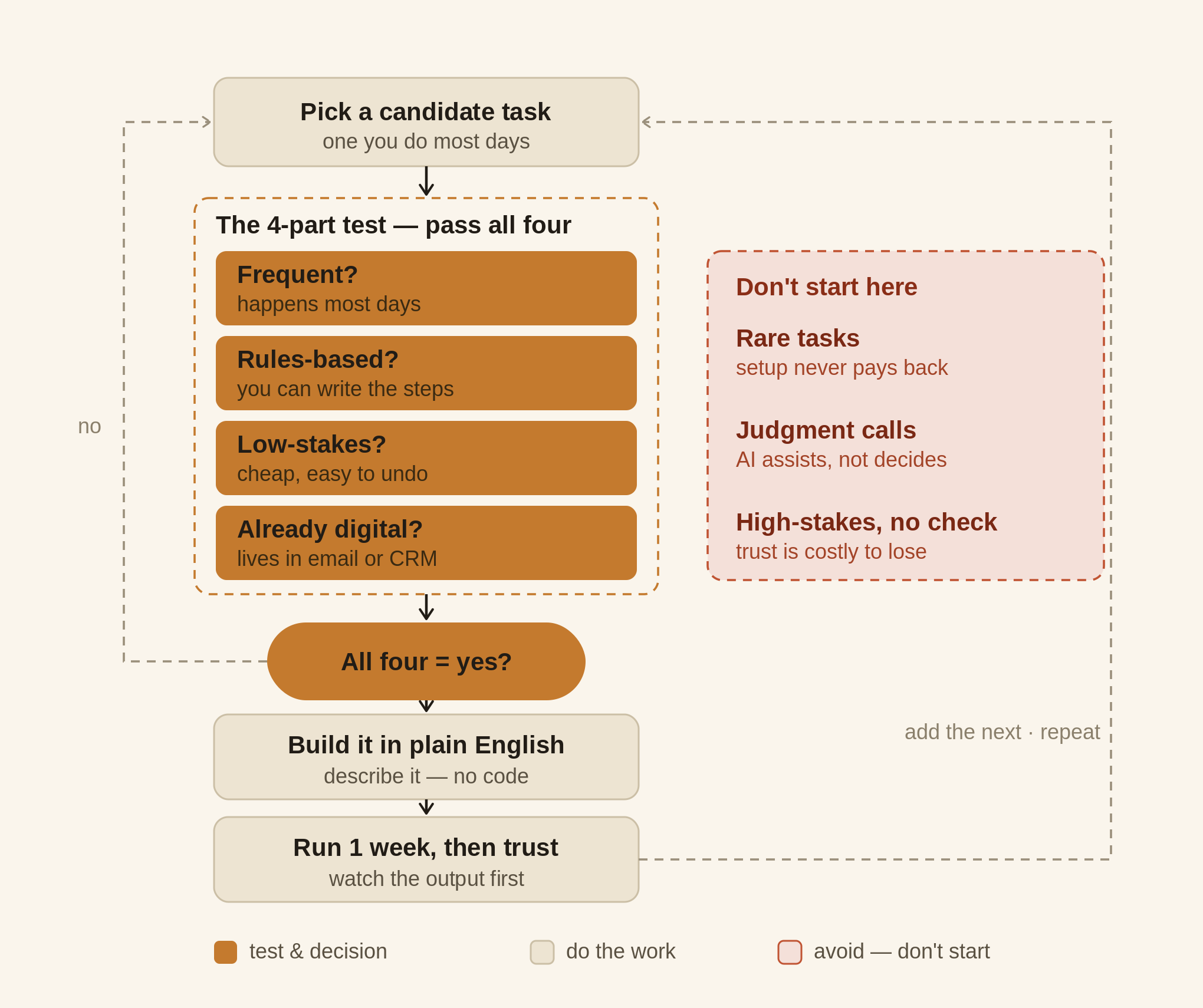
Score the task against four questions. A strong first candidate is a clear yes to all four.
Is it frequent? Automation pays back on repetition. A task you do five times a day is worth automating; one you do twice a year isn't — you'd spend more time setting it up than you'll ever save. Look for the thing someone on your team retypes, copies, or re-sends most often.
Is it rules-based? If you can describe how you do it in a few plain sentences — "when an enquiry comes in, I copy their name and service into the tracker and reply with our rates" — it's a good fit. If the task depends on gut feel, negotiation, or judgment that changes every time, it's not a first automation.
Is it low-stakes? Early on, pick tasks where a mistake is visible and cheap to fix. Logging a lead in the wrong row is a shrug; sending the wrong figure to a client is not. Save the high-stakes work for after you trust the system.
Is it already digital? Automation can only touch information it can reach — email, your inbox, a spreadsheet, your CRM. If the first step is "read the note stuck to my monitor" or "remember what the customer said on the phone," fix that first. Tasks that already live in software are ready today.
A task that's a yes on all four is your first automation. A no on any one is a signal to keep looking — or to reshape the task until it qualifies.
Which task should you actually start with?
Here's the four-part test on a real example. Say you run a small firm and every new enquiry arrives as an email. Right now, someone reads it, copies the details into your tracker or CRM, sends a first reply, and flags it for follow-up. Score it: it happens most days (frequent ✓), it follows the same steps every time (rules-based ✓), a filing slip is trivial to fix (low-stakes ✓), and it all happens in your inbox and software (already digital ✓). Four for four — this is a textbook first automation.
Set up like this, the automation watches for a new enquiry, pulls out the name, service, and availability, drops them into your tracker, sends a friendly first reply, and pings you to take it from there. You still own the relationship; the retyping just disappears. And these aren't marginal minutes — automating a single admin workflow commonly returns several hours a week (Zapier, State of Business Automation), and finance teams that automated invoice and payment handling have freed up close to ten hours a week once spent on data entry and chasing.
If new-lead intake isn't your bottleneck, the same test points to the usual first wins: logging invoices and receipts, sending appointment reminders, turning a form submission into a task, or drafting the same follow-up email you send twenty times a week. Run each through the four questions and start with the highest scorer.
What tasks should you not automate first?
Skip anything that fails the test, however tempting. The three traps:
The rare-but-annoying task. Year-end reporting is a pain, but you do it once a year — the setup will never earn its time back. Frequency is what makes automation worth it.
The judgment call. Pricing a bespoke job, handling an upset customer, deciding which supplier to use — these read as "admin" but run on judgment that changes every time. Automating them first is how you get a confident, wrong answer. Let AI assist here later; don't hand it the decision now.
The high-stakes, no-checkpoint task. Anything that sends money, signs off figures, or messages a client with no human glance in between is the wrong first project. Not because it can't be automated — because a mistake there costs trust you can't easily win back. Earn confidence on the low-stakes tasks first.
How do you go from chosen to running?
Once you've picked the task, the build is the smaller half of the job — and in 2026 you describe it in plain English to an automation platform rather than writing code: "when a new enquiry email arrives, pull out the name and service, add them to the tracker, and send our standard first reply." (Still deciding which tool? Our guide to the best AI tools for a small business groups the options by the job you want done.) Start it in a limited way, watch it for a few days with a human still glancing at the output, then let it run once you trust it. Get that one working for a full week before you touch a second. One automation you actually rely on is worth more than five you half-built and abandoned — and it's the difference between owning AI and using it. Most small-business AI efforts stall right here, on the human layer: choosing the task, fitting it to how the business really works, and building the habit. The tool was never the hard part.
The first-automation decision, at a glance
| Ask of the task | Good first automation | Leave it for later |
|---|---|---|
| How often? | Happens most days | Rare — weekly or less |
| Can you write the rules? | Yes, in a few plain lines | Depends on judgment |
| What if it slips? | Cheap, visible to fix | Costs money or trust |
| Where does it live? | Email, CRM, spreadsheet | On paper or in your head |
| Example | New-lead intake, invoice logging | Year-end reporting, pricing a bespoke job |
Not sure which task to hand over first?
That's the exact question most owners get stuck on — and it's a better problem than it feels, because it means the tools are finally the easy part. AI Fluency Hub is an AI co-pilot and coach in one: you describe your business in plain English, it learns how you actually run, and it helps you set up and run AI agents that do real work across the tools you already use — no code, no consultant, no prompt-engineering course. If you'd rather start with a clear read on where your best first automation is, take the free AI-readiness check — a short diagnostic, no sales call required.
Sources: Zapier State of Business Automation; SBE Council 2026 Small Business Tech Use Survey; 2026 workforce automation surveys. Figures are directional and tool features move fast — spot-check any specific 2026 capability before acting.